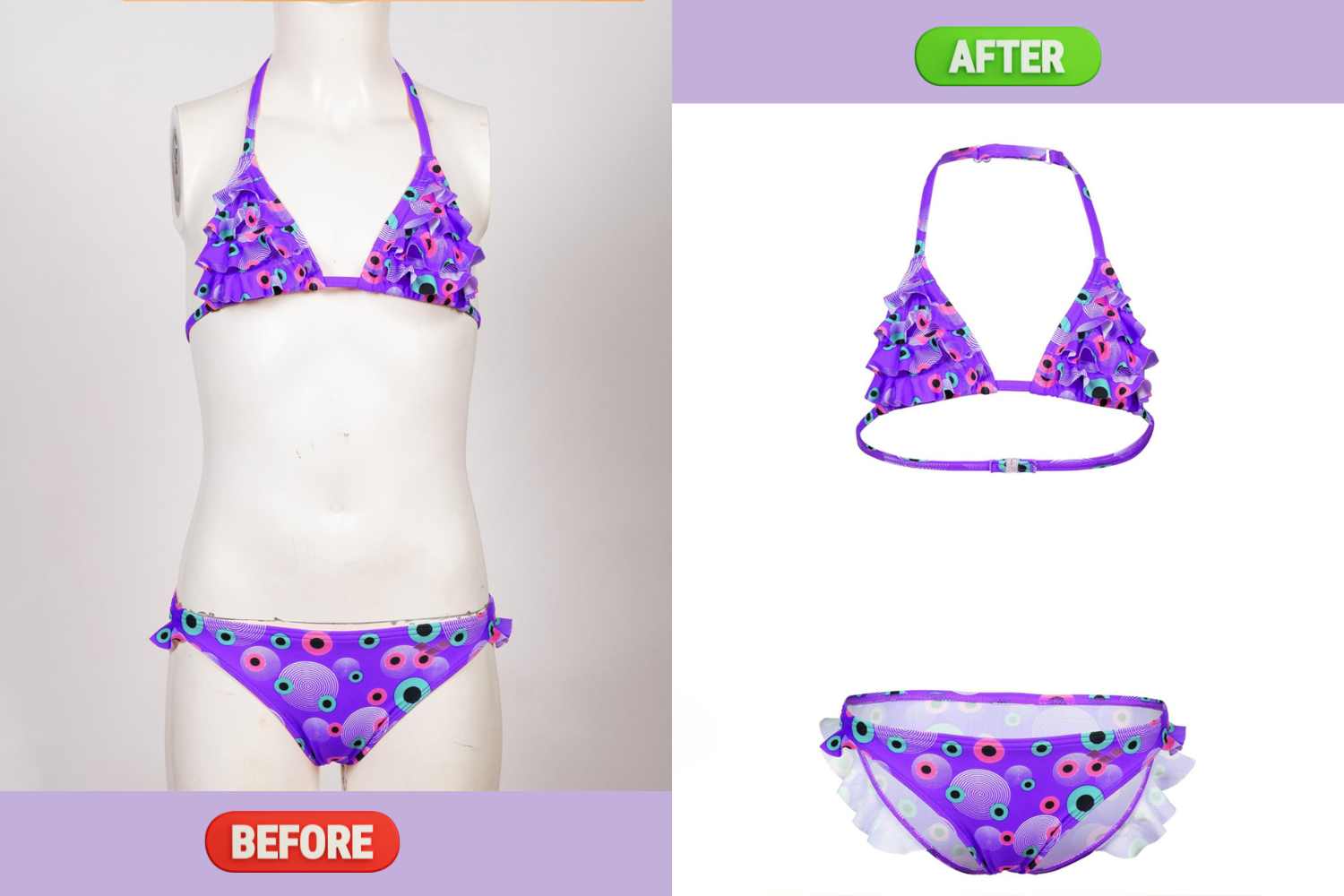
The ghost mannequin effect, also known as the invisible mannequin or hollow man effect, is a powerful photography technique widely used in eCommerce, particularly in the fashion industry. This method creates a lifelike representation of clothing items, allowing potential buyers to visualize how the garments might look when worn, without the distraction of a visible mannequin or model. 
What is the Ghost Mannequin Effect?
The ghost mannequin effect gives the illusion that clothing is being worn by an invisible figure. This technique showcases the product's shape, fit, and intricate details, which are crucial for online shoppers who cannot physically try on items. By combining multiple images—typically one of the garments worn normally and another of it inside out—photographers can create a seamless and engaging representation that highlights both the exterior and interior aspects of the clothing. Why Use the Ghost Mannequin Effect?- Enhanced Visualization: Customers can better understand how the garment will fit and look when worn, increasing their confidence in making a purchase.
- Professional Appearance: This technique elevates product images from standard to high-quality, making them more appealing on e-commerce platforms. A polished presentation can significantly boost sales and brand perception.
- Focus on Product Details: The absence of distracting elements allows customers to concentrate on the fabric, texture, and design features of the apparel, which are essential for informed purchasing decisions.
How to Create the Ghost Mannequin Effect Creating this effect involves both careful photography and skilled editing. Here's a step-by-step guide:- Photography Setup :
- Use a well-lit studio environment with a plain white background to make post-editing easier.
- Photograph your product on a mannequin or model from multiple angles. Capture both front and back views.
- For the inside-out shot, ensure that any inner details (like labels or linings) are visible.
- Editing Process :
- Open your images in photo editing software like Adobe Photoshop.
- Remove backgrounds from both images to isolate the garment.
- Layer the inside-out image behind the front-facing image, aligning them carefully to create a cohesive look.
- Refine edges and adjust the lighting to ensure that the final image appears realistic and professional.
- Final Touches :
- Enhance colors and textures as needed to make the product more visually appealing.
- Save your edited images in high resolution for use on your eCommerce site.
Benefits of Ghost Mannequin Photography- Increased Sales: High-quality images that effectively showcase products can lead to higher conversion rates as customers feel more assured about their purchases.
- Brand Differentiation: In a competitive market, unique and professional product photography can set your brand apart from others that may use less effective methods.
- Versatility: This technique works well for various types of apparel, including jackets, shirts, trousers, and dresses, making it a valuable tool for any fashion retailer.
In conclusion, adopting the ghost mannequin effect in your product photography not only enhances visual appeal but also improves customer engagement and trust. As online shopping continues to grow, investing in quality imagery will be key to standing out in the crowded eCommerce landscape. <button data-state="closed" type="button"><svg data-prefix="far" data-icon="share"></svg></button><button type="button"><svg data-prefix="far" data-icon="ellipsis"></svg></button>
 Cristian Ron /
24. 10. 26. 오후 10:12
Cristian Ron /
24. 10. 26. 오후 10:12